empiricalrun GitHub App and merge them once the changes are
ready. A few repository settings decide whether those merges go through.
Open Settings → Repository in the dashboard. The GitHub settings card checks the repository
and links to the GitHub page for anything that needs a change.
Checks
Merge settings live in GitHub under Settings → General → Pull Requests.
Branch protection
The card also lists the rulesets that apply to the default branch, including organization rulesets, and whether the Empirical GitHub App can bypass them. A ruleset that requires approvals or status checks holds back Empirical’s pull requests unless the app is on its bypass list. Rules that only restrict pushes, such as blocking force pushes or deletion, do not affect Empirical and are listed separately.Let Empirical merge pull requests
To let Empirical merge its own pull requests while direct pushes to the default branch stay blocked, add theempiricalrun app as a bypass actor. Do this everywhere the default branch is protected:
rulesets and classic branch protection both apply, and the stricter result wins.
Rulesets
- Open the ruleset in GitHub. The Add bypass button in the dashboard opens it directly. Organization rulesets are in your organization’s settings, repository rulesets under the repository’s Settings → Rules → Rulesets.
- Under Bypass list, click Add bypass and search for
empiricalrun(listed under apps). - Set its mode to For pull requests only, then save the ruleset.
Classic branch protection
- In the test repository, open Settings → Branches and edit the rule for the default branch.
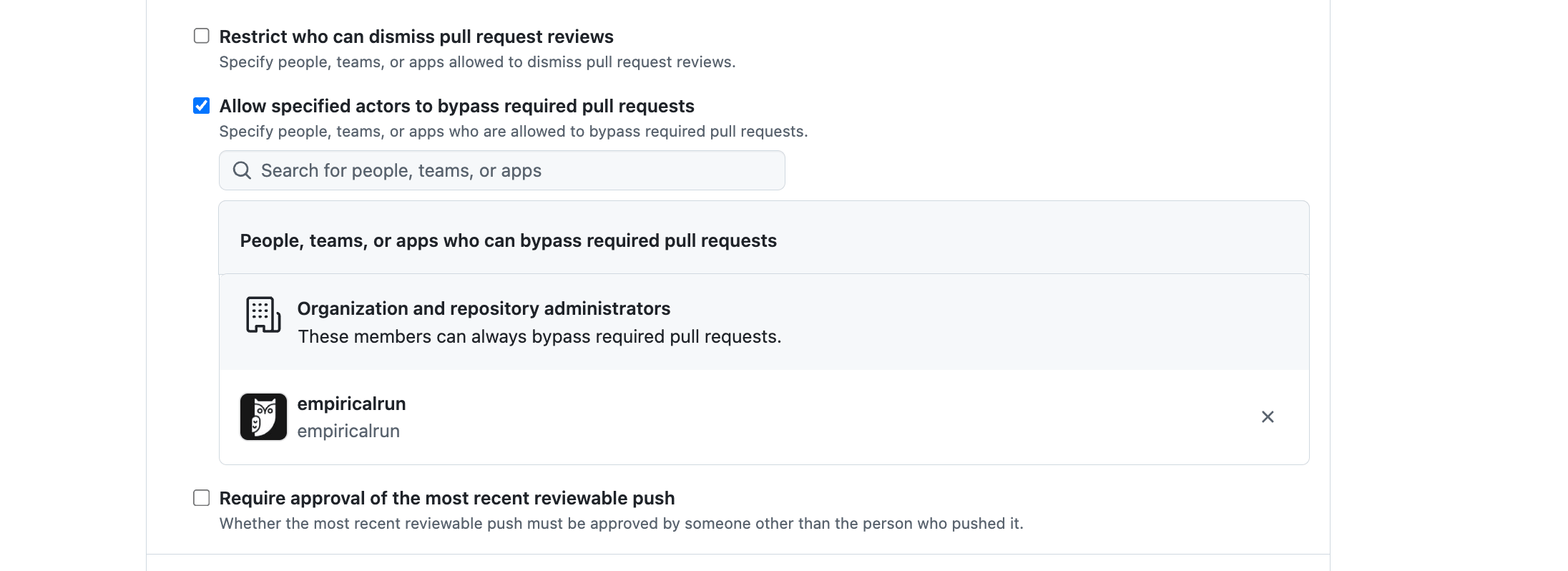
- Under Require a pull request before merging, check Allow specified actors to bypass required pull requests.
- Search for
empiricalrun, add it, and save the rule.